Facade inspection · FISP and Local Law 11 · Early access
Facade inspection software that drafts the condition list from your photos.
Photograph each drop and talk through what you see. Inspectial's AI drafts every condition by elevation, drop and element: cracked brick, spalls, open mortar joints, corroded lintels, loose coping, unsecured railings. Each one is tied to its photo and location, and your QEWI approves every one before it reaches the report.
Capture offline on the scaffold. AI drafts each condition. Your QEWI approves. Export to your report and repair scope.
- Works offline on the scaffold
- Every condition keyed to its photo
- Your QEWI approves every finding
- GeoJSON, CSV, PDF, API
Every close-up photo becomes a keyed condition your QEWI can review.
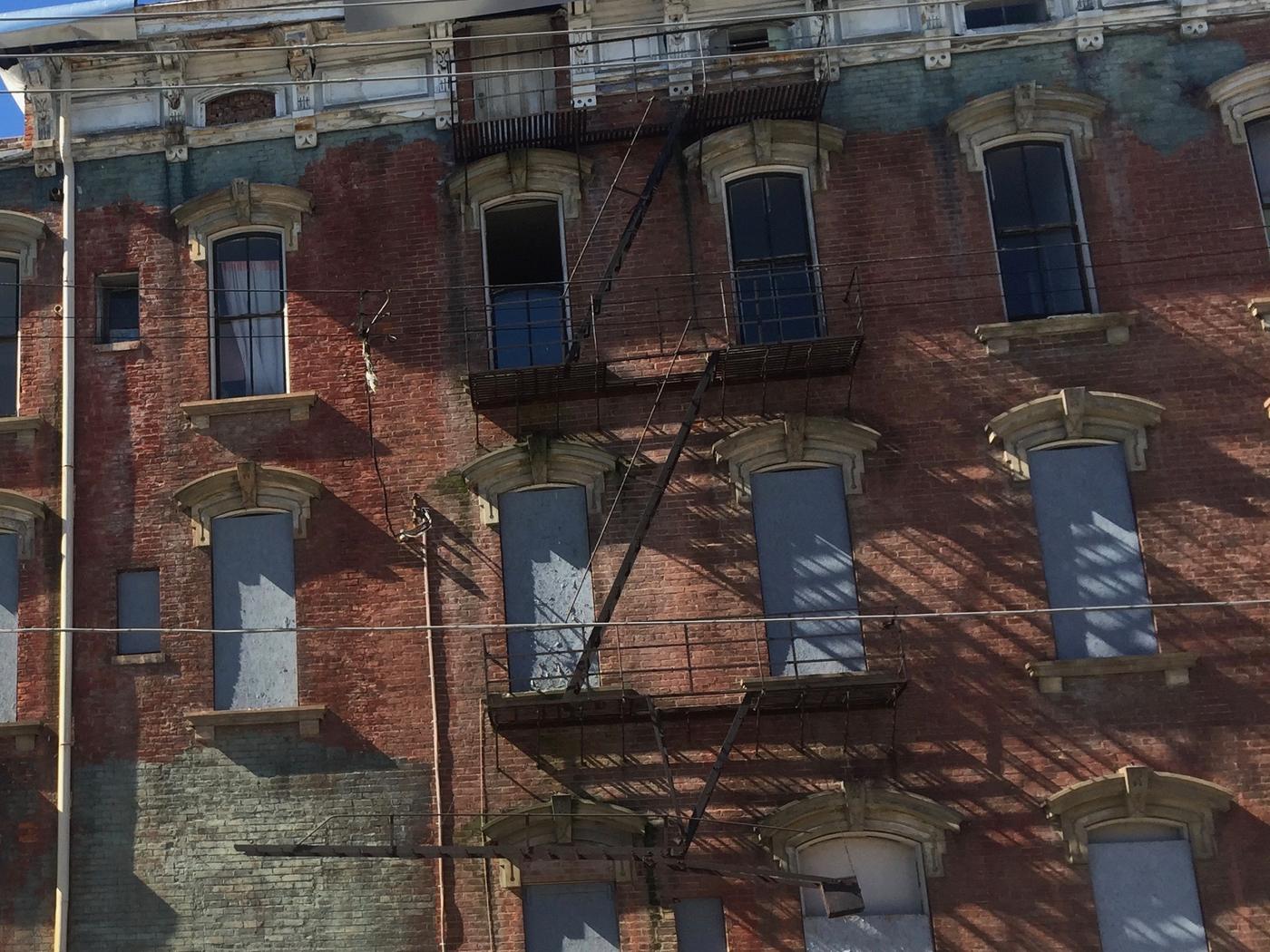
- Cornice · conditionpeeling paint, damaged bracketHuman verified
- Fire escape · corrosionsurface rust on platformsAI suggested
- Window head · surfaceweathering, soilingAI suggested
- Window · openingboardedHuman verified
- Brick · surfacepaint loss, stainingAI suggested
- Fire escape · stairdisplacement (possible)AI suggested
{
  "asset": "E-SOUTH",
  "location": { "lat": 40.8136, "lon": -73.944 },
  "cornice": {
    "condition": "peeling paint, damaged bracket",
    "status": "human_verified"
  },
  "fire_escape": {
    "corrosion": "surface rust on platforms",
    "stair": "displacement (possible)",
    "status": "ai_suggested"
  },
  "window_head": {
    "surface": "weathering, soiling",
    "status": "ai_suggested"
  },
  "window": {
    "opening": "boarded",
    "status": "human_verified"
  },
  "brick": {
    "surface": "paint loss, staining",
    "status": "ai_suggested"
  },
  "evidence": ["IMG_3318", "IMG_3321", "VN_022"],
  "confidence": 0.84
}Access is the expensive part of a facade inspection. The write-up is the slow part.
Every building comes back as hundreds of close-up photos from the drops, notes from the binocular walk-around and voice memos from the scaffold. Someone then matches each photo to its elevation and location, describes and classifies every condition, and builds the key elevations the report needs.
NYC DOB expects the list of conditions to match the photos keyed in. Inspectial can't shorten the time on the rig, but it takes the sorting and the first draft of every condition off your team's desk.
- Close-up photoshundreds per building
- Video clipsdrops and the walk-around
- Voice notesrecorded on the scaffold
- Last cycle's reportopen SWARMP items in a PDF
How it works
One workflow from the scaffold to your report. AI drafts the conditions; the QEWI makes the call.
-
Capture offline, drop by drop
The field app follows your inspection program: elevations, drops and appurtenances. Every photo, clip and voice note is stamped with time, GPS, elevation and drop, so its place on the facade is known before anyone opens a laptop. No signal needed on the scaffold or the roof.
-
AI drafts each condition
Photos and notes are grouped by elevation and element and turned into draft conditions: cracking, spalling, open mortar joints, corroded lintels and shelf angles, loose units, deteriorated sealant, unsecured railings. Each has a location, a suggested classification, a confidence and the photos it came from.
-
Your QEWI decides
The QEWI checks each condition next to its photos and approves, edits or rejects it, including the Safe, SWARMP or Unsafe classification. The AI's suggestion is kept separately from the approved value, so you can always see what a person changed.
-
Export to your report
Approved conditions go out as CSV, GeoJSON, a PDF condition report or through the API, keyed to elevation, drop and photo. Your team builds the TR6 and the repair scope from them, and files in DOB NOW as it does today.
What the facade pack records
Six element groups, the defects a close-up inspection looks for, and the three FISP classifications. During early access we map it to your firm's condition list, report template and elevation naming.
Masonry and cladding
Lintels, shelf angles and cavity walls
Parapets and coping
Windows and sealants
Balconies, fire escapes and railings
Appurtenances
FISP condition classification
- Safe
- Needs no repair or maintenance to keep the exterior sound, and won't become unsafe in the next five years.
- SWARMP
- Safe with a repair and maintenance program: safe today, but needs work within one to five years to stop it becoming unsafe. Left uncorrected, it must be reported as Unsafe next cycle.
- Unsafe
- Hazardous to people or property; repair within one year. The QEWI notifies DOB and the owner immediately and recommends public protection, such as a sidewalk shed.
Rules and references
Capture in the field. Review from any desk.
Field app preview: a map of today's route with markers by inspection status, working offline, with B-0416 selected and ready to inspect. Web app preview: the Cycle 10 FISP portfolio project on a map, with geotagged field photos pinned at each site and a sidebar listing each site's review status.
AI creates the inspection record, not just the report
Keep your GIS and asset system. Inspectial automates the inspection-coding layer in front of it, under rules you can trust.
- Agent-ready data, not documents
- The structured dataset is the source of truth, so your GIS, scripts and AI agents read it directly. Reports are generated from approved observations, never written straight from the media.
- Evidence first
- Every observation references the photos, clips or notes behind it. A finding never exists only as an AI sentence.
- A human approves
- AI proposes; a qualified person decides. Inspectial is not an autonomous inspector, and only approved inspections become official records. Every value is tagged with who stands behind it.
- Location is first-class
- Evidence, observations and assets carry coordinates, so the output drops onto a map without cleanup.
- Offline-first
- The full capture flow works with no signal. Data syncs when the connection returns.
- Configurable, not custom-built
- Your checklist, condition codes and report format live in a template we set up with you. Not a new app.
Who it's for
Outputs and integrations
Inspectial feeds the tools you already run. It doesn't ask you to move your asset data anywhere, and because the output is structured, evidence-linked data rather than a document, it also works as input for AI agents and automations.
Works with
- ArcGIS
- QGIS
- PostGIS
- MapLibre
Formats
- GeoJSON
- CSV
- REST API
- Excelplanned
- Shapefileplanned
- GeoPackageplanned
Questions
Something else? Write to pilot@inspectial.com.
Does the AI replace the QEWI?
No. The QEWI, or staff under the QEWI's direct supervision, performs the critical examination and signs the report. AI drafts conditions from their photos and notes, and the QEWI approves, edits or rejects every one. NYC DOB Buildings Bulletin 2021-012 allows AI software to supplement a QEWI's work, provided the QEWI verifies all of its output and hands-on inspections still happen. Inspectial is built around that rule.
Does it change the close-up inspection requirement?
No. 1 RCNY §103-04 still requires close-up examinations from a scaffold or other platform at intervals of no more than 60 feet along each elevation that fronts a public right-of-way, and a final walk-around with binoculars. Inspectial works on the evidence you capture during those drops. It saves office time, not time on the rig.
Who decides Safe, SWARMP or Unsafe?
The QEWI. The AI can suggest a classification for each condition, shown as a suggestion next to the photos behind it, but only the QEWI's approved value goes into the record and the report. When a condition is Unsafe, notifying DOB and the owner stays with the QEWI; Inspectial doesn't send it.
Does it write our TR6 and file it in DOB NOW?
It doesn't file. Inspectial exports approved conditions as CSV, GeoJSON, a PDF condition report or through the API, keyed to elevation, drop and photo, so your team can assemble the TR6 in your own format and file in DOB NOW: Safety as you do today. During early access we shape the export around your report template.
Can we use drone photos?
Not yet. The first release works with what the field app captures: photos, video keyframes, voice notes and GPS. Under 1 RCNY §103-04, drones and high-resolution photography don't replace close-up inspections in any case.
Can it compare this cycle with the last one?
That's what the structured record is for. Every approved condition is stored with its element, location, classification and photos, so the next inspection starts from that list instead of a PDF, and the inspector confirms, updates or closes each item. FISP reports must compare current conditions with the previous cycle; this is where that comparison comes from. For buildings whose last report exists only as a PDF, we work out the starting point with you during early access.
Does it work outside New York City?
Yes. The facade pack is a template, so the element list, condition codes and classifications are configuration, not code. Chicago, Boston and other cities with facade ordinances use different intervals and report formats, and we set the template to match the one you work under.
What about parking structures?
Parking structure condition assessments, such as NYC Local Law 126 inspections with their Safe, SREM and Unsafe classifications, follow the same pattern: photos of representative conditions, a site plan and a qualified inspector's sign-off. It's a separate template. Tell us in the form if you need it.
Request early access to the facade pack
We're working with a small number of facade engineering and architecture firms. Tell us which ordinance you inspect under, roughly how many buildings a year, and how you write up conditions today.
- Bring a past inspection: the close-up photos and the report you filed from them.
- We set up a facade template that matches your condition list and elevation naming.
- Your QEWI reviews the AI's draft conditions against your own findings.
- Approved conditions export as CSV, GeoJSON or PDF, or through the API, in the shape your report needs.