Facility and property condition assessments · Early access
Facility condition assessment software that writes up the walk-through.
Photograph the site, roof, envelope, mechanical, plumbing, electrical, fire and life safety systems and interiors. Inspectial's AI drafts each observation by building system, with its condition, deficiency and the photos behind it. Your assessor approves every finding, and the approved data feeds your report, cost tables and capital plan.
Capture offline. AI drafts each system. A qualified assessor approves. Export a PDF report, CSV or GeoJSON.
- Works offline
- Every finding linked to its photo
- A qualified reviewer approves
- GeoJSON, CSV, PDF, API
Every walk-through photo becomes a system-level observation your assessor can review.
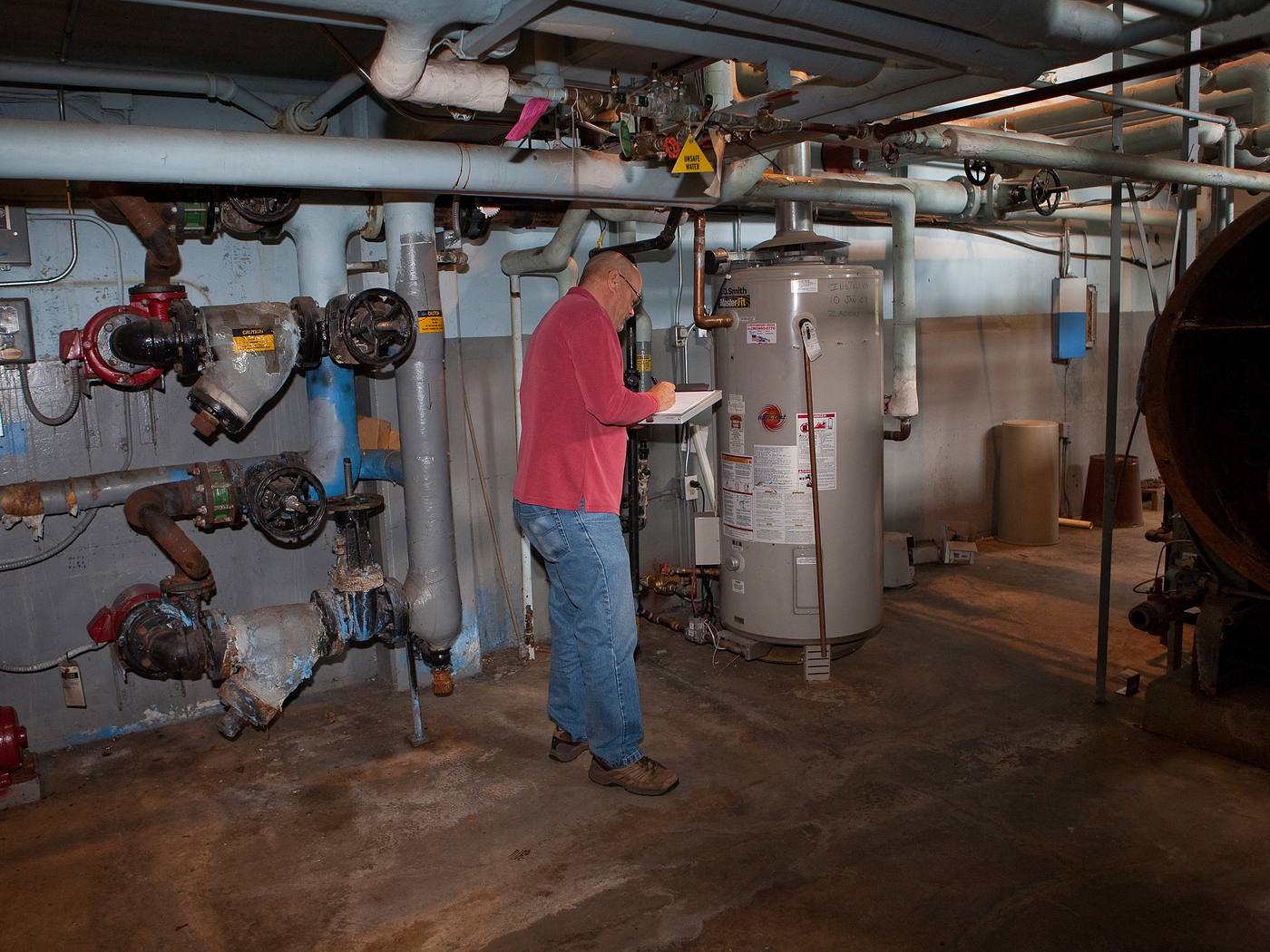
- Heating piping · strainerheavy scale and corrosionAI suggested
- Heating piping · insulationjacket torn at fittingsAI suggested
- Heating piping · valvesrust at bonnets and flangesAI suggested
- Water heater · conditiongood, no leaks visibleHuman verified
- Boiler · remaining useful life~3 yrs (estimate)AI suggested
- Floor · finishstaining, no standing waterHuman verified
{
  "asset": "BLD-014",
  "location": { "lat": 41.6587, "lon": -91.5349 },
  "heating_piping": {
    "strainer": "heavy scale and corrosion",
    "insulation": "jacket torn at fittings",
    "valves": "rust at bonnets and flanges",
    "status": "ai_suggested"
  },
  "water_heater": {
    "condition": "good, no leaks visible",
    "status": "human_verified"
  },
  "boiler": {
    "remaining_useful_life": "~3 yrs (estimate)",
    "status": "ai_suggested"
  },
  "floor": {
    "finish": "staining, no standing water",
    "status": "human_verified"
  },
  "evidence": ["IMG_3104", "IMG_3107", "VN_0012"],
  "confidence": 0.86
}Walking the building is the quick part. Writing it up is not.
An assessor comes back from one building with hundreds of photos across the site, roof, envelope, structure, MEP systems, fire and life safety and interiors, plus voice notes and a stack of documents. Back at the desk, someone sorts the photos by system, describes each deficiency, rates its condition, judges remaining useful life and builds the cost tables.
Across a portfolio, that write-up limits how many buildings a team can assess. And because every report is written a little differently, comparing one school with another, or this assessment with the last one, means reading PDFs side by side.
- Photoshundreds per building
- Voice and text notesroom by room, unstructured
- Documents and interviewspermits, maintenance records
- Floor plans, GPS, last reportin separate places
How it works
One workflow from the walk-through to your capital plan. AI drafts the observations; the assessor makes the call.
-
Capture offline, system by system
The field app walks the assessor through your checklist: site, roof, envelope, structure, mechanical, plumbing, electrical, fire and life safety, interiors and accessibility. Every photo, clip and voice note is stamped with time, GPS, building and system. No signal needed in the basement.
-
AI drafts the observations
Evidence is grouped by building system and turned into draft observations: component, condition, deficiency and a suggested priority, plus remaining useful life where the evidence supports it. Each comes with a confidence and the photos it came from.
-
An assessor approves
A qualified assessor checks each observation next to its photos and approves, edits or rejects it. The AI's suggestion is kept separately from the approved value, so you can always see what a person changed.
-
Export for your report and cost model
Approved observations become the PDF report and go out as CSV, GeoJSON or through the API, keyed to your building IDs and system codes, ready for your cost tables and capital planning tool.
What the condition assessment pack records
Ten building systems, the observations assessors write up most often, and a four-step condition rating per system or component. In early access we map it to your report template, your building and asset IDs and your system codes, such as Uniformat II.
Site
Roofing
Envelope
Structure
Mechanical / HVAC
Plumbing
Electrical
Fire and life safety
Interiors
Accessibility
Condition rating
- Good
- Performing as intended. Normal wear; routine maintenance only.
- Fair
- Visible wear or minor deficiencies. Repair, or plan replacement within the normal capital cycle.
- Poor
- Significant deterioration or near the end of its useful life. Repair or replace soon.
- Critical
- Failed, unsafe or at risk of failure, including life-safety items. Immediate action.
Reference standards
Capture in the field. Review from any desk.
Field app preview: a map of today's route with markers by inspection status, working offline, with BLD-018 selected and ready to inspect. Web app preview: the District facilities 2026 project on a map, with geotagged field photos pinned at each site and a sidebar listing each site's review status.
AI creates the inspection record, not just the report
Keep your GIS and asset system. Inspectial automates the inspection-coding layer in front of it, under rules you can trust.
- Agent-ready data, not documents
- The structured dataset is the source of truth, so your GIS, scripts and AI agents read it directly. Reports are generated from approved observations, never written straight from the media.
- Evidence first
- Every observation references the photos, clips or notes behind it. A finding never exists only as an AI sentence.
- A human approves
- AI proposes; a qualified person decides. Inspectial is not an autonomous inspector, and only approved inspections become official records. Every value is tagged with who stands behind it.
- Location is first-class
- Evidence, observations and assets carry coordinates, so the output drops onto a map without cleanup.
- Offline-first
- The full capture flow works with no signal. Data syncs when the connection returns.
- Configurable, not custom-built
- Your checklist, condition codes and report format live in a template we set up with you. Not a new app.
Who it's for
Outputs and integrations
Inspectial feeds the tools you already run. It doesn't ask you to move your asset data anywhere, and because the output is structured, evidence-linked data rather than a document, it also works as input for AI agents and automations.
Works with
- ArcGIS
- QGIS
- PostGIS
- MapLibre
Formats
- GeoJSON
- CSV
- REST API
- Excelplanned
- Shapefileplanned
- GeoPackageplanned
Questions
Something else? Write to pilot@inspectial.com.
Does the AI replace the assessor?
No. AI drafts the observations; a qualified assessor approves, edits or rejects each one. Condition ratings, remaining useful life, priorities and costs stay the assessor's professional opinion. Only approved assessments become official records, and every value shows whether a person verified it.
Can it follow our report template and cost model?
Yes for the template: building systems, observation types, the condition scale, fields such as quantity, remaining useful life and priority, and the PDF layout are configuration, not code. Inspectial doesn't price repairs. Approved observations export with your building IDs and system codes, so your own cost tables or cost model pick them up.
Does it make our PCAs conform to ASTM E2018?
No software does that on its own. ASTM E2018-24 describes the consultant's process: a walk-through survey, document review and interviews, and opinions of cost for the deficiencies found. Inspectial covers the documentation of the walk-through, with photo-linked observations per system, and the template can mirror the sections of your E2018 or lender-form report. Conformance stays with your firm.
Can the AI estimate remaining useful life?
It can suggest one when the evidence supports it, for example a legible install date or nameplate plus visible condition, and it marks the value as an estimate. Your assessor confirms or changes it against your own useful-life tables. Where a photo can't support an estimate, the AI leaves it blank instead of guessing.
Can we compare buildings or calculate FCI?
You can compare: every observation is structured data tied to a building, a system and a location, so condition lines up across buildings and assessment cycles, on a map. Inspectial doesn't calculate costs or the Facility Condition Index (deficiencies divided by current replacement value). It gives you the approved deficiency list per building and system that your cost model and FCI are built from.
How does the data get into our capital planning tool?
Approved assessments export as CSV or GeoJSON keyed to your building IDs and system codes, as a PDF report rendered from the approved data, or through the REST API. Excel, Shapefile and GeoPackage are planned. There are no direct CAFM or CMMS integrations yet; CSV and the API are the way in.
Does the field app work in basements and mechanical rooms?
Yes. The full capture flow works offline, in a basement plant room or on a roof. Photos, clips and voice notes sync when the connection returns.
Can we use our past assessments?
Yes, that's how early access starts: bring the walk-through photos from past assessments and the reports you wrote from them, and we compare the AI's observations with your assessors' findings before you use it on live work.
Request early access to the condition assessment pack
The condition assessment pack is in early access while our culvert pilot runs. We're looking for a few engineering firms, FCA consultants and facility teams to shape it. Tell us what you assess, roughly how many buildings a year, and where the data goes after the report.
- Bring past assessments: walk-through photos and the reports you wrote from them.
- We set up a template that matches your building systems, condition scale and report sections.
- You review the AI's draft observations against your assessors' findings.
- Approved data arrives as a PDF report, CSV or GeoJSON, or through the API, ready for your cost model.