HUD NSPIRE inspections · Early access
NSPIRE inspection software that drafts the deficiency list for you.
Photograph each room and speak your notes. Inspectial's AI drafts the deficiencies in NSPIRE terms: the standard, the location, a suggested severity and the photo behind each one. Your inspector confirms every item, and the result goes out as a report and as data instead of being re-keyed from notes.
Capture offline, unit by unit. AI drafts each deficiency. The inspector confirms. Export the report and the data.
- Works offline
- Every deficiency linked to its photo
- A qualified inspector confirms
- PDF, CSV, GeoJSON, API
Every unit photo becomes a deficiency record your inspector can confirm.
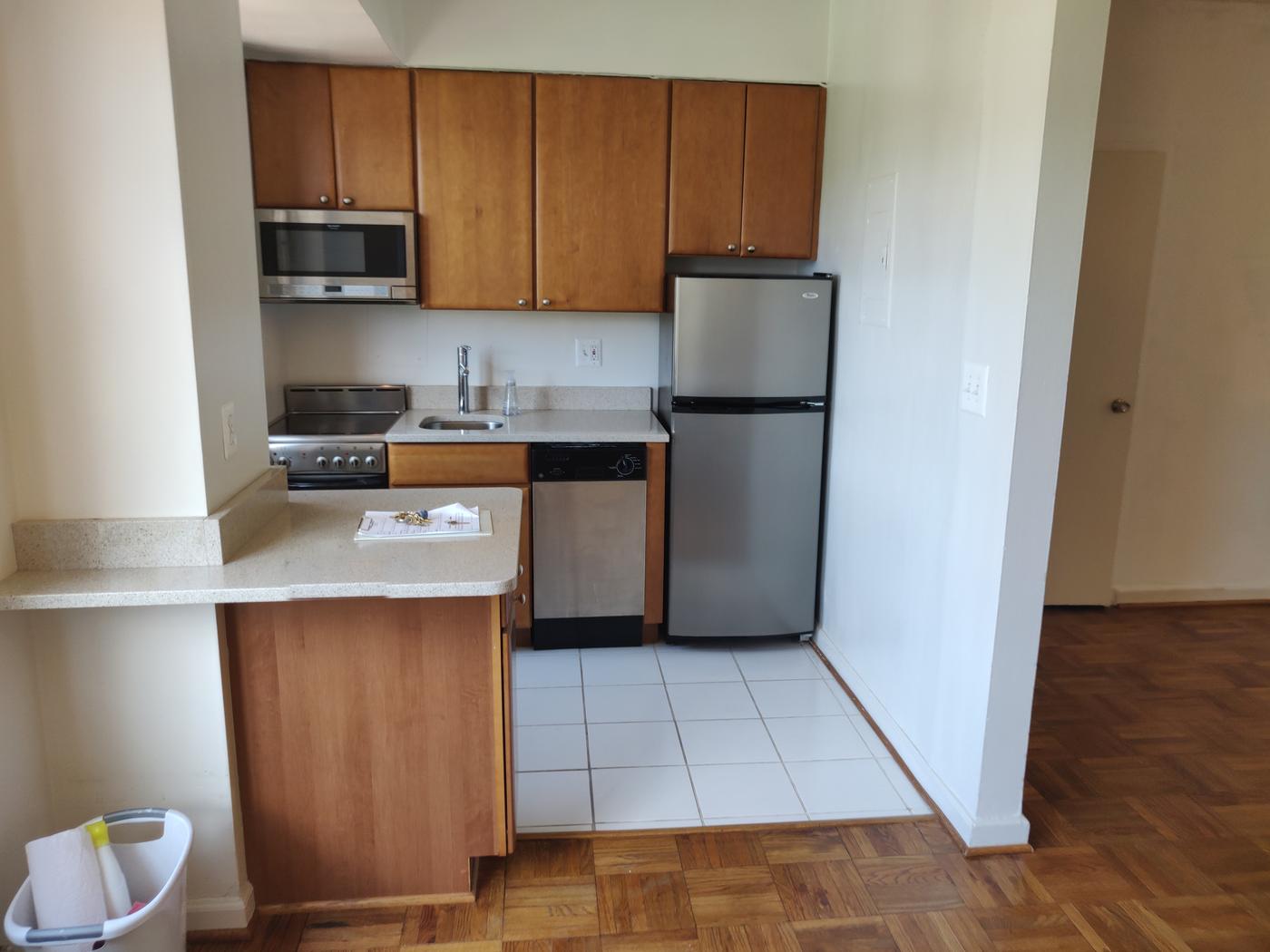
- Kitchen · outlet (GFCI)GFCI type by sink; trip test neededAI suggested
- Kitchen · rangepresent, controls intactAI suggested
- Kitchen · refrigeratorpresent, no damage visibleAI suggested
- Electrical · panel coverclosed, cover intactHuman verified
- Electrical · switch platein place, no exposed wiringHuman verified
- Floor · thresholdraised edge (possible trip hazard)AI suggested
{
  "asset": "U-2041",
  "location": { "lat": 39.9523, "lon": -82.9871 },
  "kitchen": {
    "outlet_gfci": "GFCI type by sink; trip test needed",
    "range": "present, controls intact",
    "refrigerator": "present, no damage visible",
    "status": "ai_suggested"
  },
  "electrical": {
    "panel_cover": "closed, cover intact",
    "switch_plate": "in place, no exposed wiring",
    "status": "human_verified"
  },
  "floor": {
    "threshold": "raised edge (possible trip hazard)",
    "status": "ai_suggested"
  },
  "evidence": ["IMG_3307", "IMG_3309", "VOICE_12"],
  "confidence": 0.86
}
The walk-through is quick. The deficiency list is not.
An NSPIRE inspection covers the unit, the inside common areas and the outside of the property. Each deficiency has to be matched to the right standard, given a severity and tied to a location. Life-threatening items have to reach the owner fast, because the 24-hour correction clock starts at notice.
Meanwhile the photos sit on a phone and the notes on paper or a tablet, and someone re-keys them into a report. For voucher programs the volume is about to shift: HUD's NSPIRE compliance date for HCV and PBV units is January 31, 2027, when unit inspections move from HQS to NSPIRE.
- Photos5 to 30 per unit
- Notesvoice, tablet or paper
- Unit and roommatched up afterwards
- The last inspectionin another system
How it works
One workflow from the unit to the deficiency report. AI does the drafting; the inspector makes the call.
-
Capture offline, room by room
The field app lists today's units and walks the inspector through the unit, the inside common areas and the outside. Every photo, clip and voice note is stamped with time, GPS, unit and room. No signal needed in a basement or a stairwell.
-
AI drafts the deficiencies
Evidence is grouped by room and turned into draft deficiencies: the NSPIRE standard it may fall under, the location, a suggested severity, a confidence and the photos it came from. Functional tests, like whether a GFCI trips or a smoke alarm sounds, come from the inspector's checklist, not from a guess at a photo.
-
The inspector confirms
A qualified inspector reviews each item next to its photos and approves, edits or rejects it, severity included. The AI's draft is kept separately from the approved value, so you can always see what a person changed. Only approved inspections become official.
-
Export the report and the data
Approved inspections go out as a PDF deficiency report, CSV or GeoJSON, or through the REST API, keyed to your unit IDs. The report is rendered from the same approved data, so the report you send and the data you keep match.
What the NSPIRE pack records
Deficiencies by inspectable area, matched to the NSPIRE standards and HUD's four severity levels. The timeframes below are HUD's defaults; individual standards and notices can set others. For voucher units, anything not life-threatening is due within 30 days unless the PHA approves more time. In early access we set the template up with your checklist and report format.
Inspectable areas
Fire safety and egress
Electrical
Health, safety and pests
Water, plumbing and heat
Structure and building
Deficiency severity
- Low
- Needed for habitability, but no substantive health or safety risk. Public housing: fix within 60 days.
- Moderate
- Public housing: fix within 30 days.
- Severe
- Public housing: fix within 24 hours of notice.
- Life-threatening
- Fix within 24 hours of notice, in public housing and voucher units alike.
Reference standards
Capture in the field. Review from any desk.
Field app preview: a map of today's route with markers by inspection status, working offline, with U-2063 selected and ready to inspect. Web app preview: the HCV inspections, October project on a map, with geotagged field photos pinned at each site and a sidebar listing each site's review status.
AI creates the inspection record, not just the report
Keep your inspection software and your forms. Inspectial drafts the deficiency record in front of them, under rules you can trust.
- Agent-ready data, not documents
- The structured dataset is the source of truth, so your GIS, scripts and AI agents read it directly. Reports are generated from approved observations, never written straight from the media.
- Evidence first
- Every observation references the photos, clips or notes behind it. A finding never exists only as an AI sentence.
- A human approves
- AI proposes; a qualified person decides. Inspectial is not an autonomous inspector, and only approved inspections become official records. Every value is tagged with who stands behind it.
- Location is first-class
- Evidence, observations and assets carry coordinates, so the output drops onto a map without cleanup.
- Offline-first
- The full capture flow works with no signal. Data syncs when the connection returns.
- Configurable, not custom-built
- Your checklist, condition codes and report format live in a template we set up with you. Not a new app.
Who it's for
Outputs and integrations
Inspectial feeds the tools you already run. It doesn't ask you to move your asset data anywhere, and because the output is structured, evidence-linked data rather than a document, it also works as input for AI agents and automations.
Works with
- Excel and CSV
- Your inspection or property management software (via CSV or API)
- GIS, if you map your portfolio
Formats
- GeoJSON
- CSV
- REST API
- Excelplanned
- Shapefileplanned
- GeoPackageplanned
Questions
Something else? Write to pilot@inspectial.com.
Does the AI replace the NSPIRE inspector?
No. Inspectial drafts deficiencies from the photos and notes your inspector captures; it doesn't inspect anything. A qualified inspector approves, edits or rejects every item, severity included. Only approved inspections become official, and every value shows whether a person verified it.
Does it calculate a REAC score or submit to HUD?
No. Inspectial doesn't calculate REAC or NSPIRE scores and doesn't submit anything to HUD systems. It gives your inspector a draft deficiency list in NSPIRE terms to confirm, and exports the approved result as a report and data for your own process.
How does it handle severity levels and deadlines?
Each draft deficiency carries a suggested severity: life-threatening, severe, moderate or low. The inspector confirms or changes it before anything is official. HUD's default correction timeframes run from 24 hours for life-threatening and severe items to 60 days for low ones in public housing. In voucher units, life-threatening items are due within 24 hours and everything else within 30 days, unless the PHA approves an extension.
We still inspect to HQS. Can we use it now?
Yes. The checklist is a template, not code, so in early access we set it up with the checklist you use today and switch it to NSPIRE when your program does. HUD's NSPIRE compliance date for HCV and PBV units is January 31, 2027.
Can we use it for self-inspections and mock REAC inspections?
Yes. The same capture flow works for PHA self-inspections and for owners walking their property before a REAC inspection. Findings are tied to photos and locations, so maintenance knows what to fix. It doesn't replace the official inspection.
What about tenant privacy in the photos?
Inspectors photograph the deficiency, not the household, the same way they do today. Every photo stays attached to the inspection and the item it documents. In early access we agree with you how long evidence is kept and who can see it before any real inspection data comes in.
Does the field app work without signal?
Yes. The full capture flow works offline, in a basement, a boiler room or a stairwell. Photos, clips and notes stay on the phone and sync when the connection returns.
Does it replace our inspection software?
No. Approved inspections export as a PDF report, CSV or GeoJSON, or through the REST API, keyed to your unit IDs. There's no direct connector to housing or property management software yet, so in early access we match the export to the fields you import.
Request early access to the NSPIRE pack
We're looking for a few PHAs, inspection firms and property managers to shape the NSPIRE template. Tell us what you inspect, roughly how many units a year, and which inspection or housing software you use.
- Bring past inspections: unit photos and the deficiency reports written from them.
- We set up the template with your checklist, NSPIRE standards and report format.
- Your inspectors compare the AI's drafts with their own findings.
- Exports arrive as a PDF report, CSV or GeoJSON, or through the API.