Commercial roof inspection · Early access
Roof inspection software that writes up every defect from your photos.
Photograph the field, seams, flashings, drains and rooftop equipment. Inspectial's AI codes open seams, blisters, ponding, flashing failures, blocked drains and corrosion into a structured, evidence-linked roof record with a suggested condition rating. Your inspector approves every finding, and each building's data stays comparable from one survey to the next.
Capture offline on the roof. AI codes each defect. A human approves. Export a PDF report, GeoJSON or CSV.
- Works offline
- Every finding linked to its photo
- A qualified reviewer approves
- GeoJSON, CSV, PDF, API
Every roof photo becomes a coded finding your team can review.
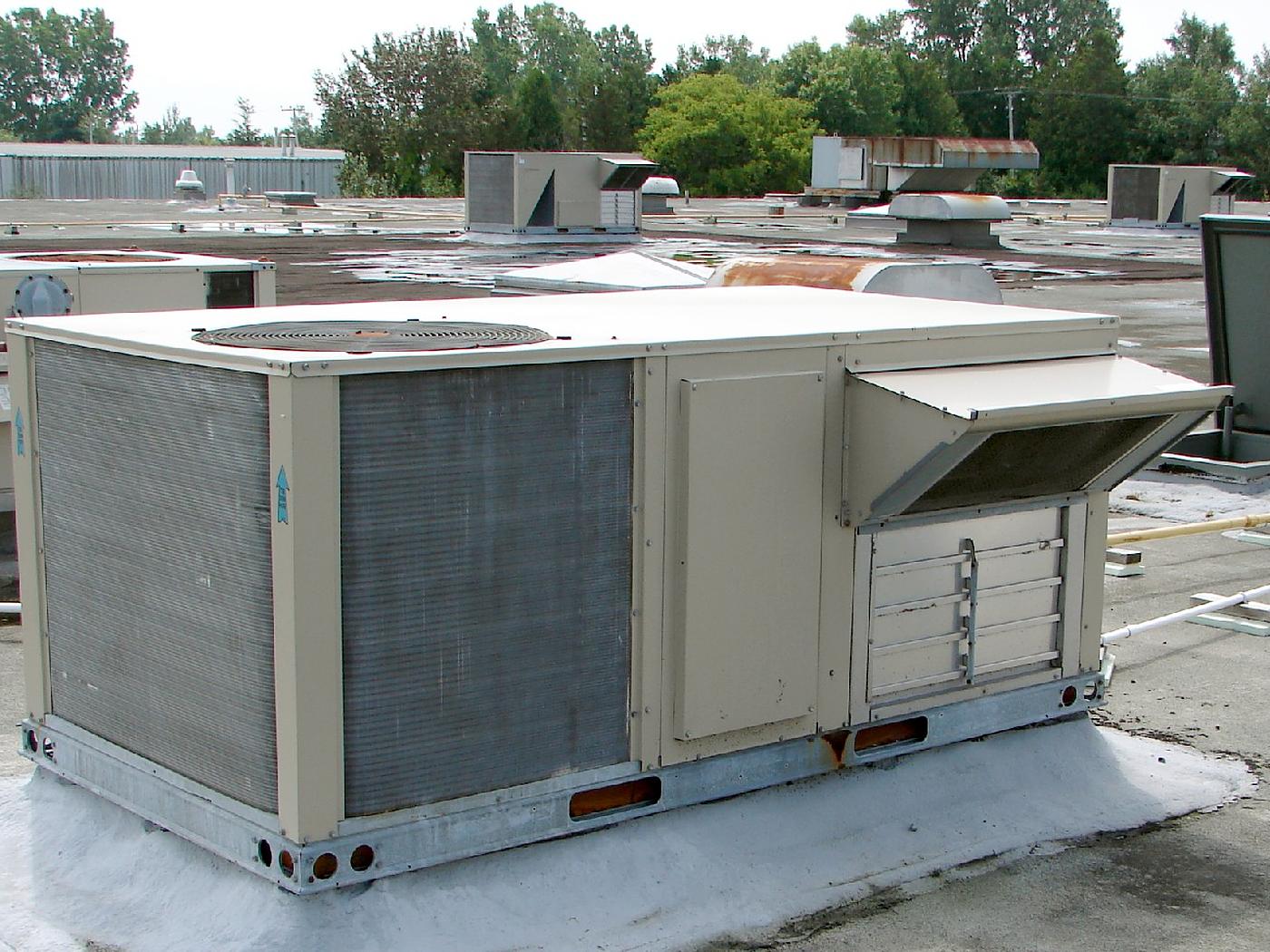
- Equipment curb · flashingcoated, no splits visibleHuman verified
- Rooftop unit · corrosionsurface rust at base railAI suggested
- Field membrane · drainagestanding water (possible ponding)AI suggested
- Field membrane · surfaceweathered, minor debrisAI suggested
- Exhaust duct · corrosionheavy surface rustAI suggested
- Piping · supportson pipe blocks, intactHuman verified
{
  "asset": "R-0318",
  "location": { "lat": 41.8853, "lon": -87.9773 },
  "equipment_curb": {
    "flashing": "coated, no splits visible",
    "status": "human_verified"
  },
  "rooftop_unit": {
    "corrosion": "surface rust at base rail",
    "status": "ai_suggested"
  },
  "field_membrane": {
    "drainage": "standing water (possible ponding)",
    "surface": "weathered, minor debris",
    "status": "ai_suggested"
  },
  "exhaust_duct": {
    "corrosion": "heavy surface rust",
    "status": "ai_suggested"
  },
  "piping": {
    "supports": "on pipe blocks, intact",
    "status": "human_verified"
  },
  "evidence": ["IMG_2207", "IMG_2209"],
  "confidence": 0.88
}Walking the roof is the quick part. The write-up is not.
One roof comes back as dozens of photos, a few voice notes and a marked-up roof plan. Someone in the office then matches each photo to its roof section, describes every defect, rates the roof and builds the report for the owner.
Across a portfolio of buildings, that write-up limits how many roofs a team can survey each season. And because every report is written a little differently, comparing one building with another, or this spring with last fall, means reading PDFs side by side.
- Photosdozens per roof
- Video clipsfield, perimeter, equipment
- Voice and text notesunstructured
- GPS, roof plan, last surveyin separate places
How it works
One workflow from the site visit to your asset system. AI does the coding; people make the call.
-
Capture offline, roof by roof
The field app lists today's buildings and walks the inspector through the roof checklist: field, seams, perimeter and flashings, drains, penetrations and rooftop equipment. Every photo, clip and voice note is stamped with time, GPS and building ID. No signal needed.
-
AI codes the defects
Evidence is grouped by roof section and component and turned into coded observations: open seams, punctures, blisters, ponding, flashing and sealant failures, blocked drains and corrosion, each with a severity, a confidence and the photos it came from.
-
An inspector approves
A qualified reviewer checks each finding next to its photos and approves, edits or rejects it. The AI's suggestion is kept separately from the approved value, so you can always see what a person changed.
-
Report and export
Approved findings become the PDF report for the owner and go out as GeoJSON, CSV or through the API, keyed to your building and roof section IDs, so condition stays comparable across buildings and surveys.
What the roof pack records
Seven components, the defects inspectors write up most often, and a four-step condition scale per roof section. In early access we map it to your report template, your roof section IDs and your own rating method, including a 0–100 Roof Condition Index if you use one.
Field membrane or covering
Seams and laps
Flashings and terminations
Drains, gutters and scuppers
Penetrations and rooftop equipment
Edges and copings
Deck and structure signs
Condition scale
- Good
- Watertight and performing. Isolated minor defects at most; routine maintenance.
- Fair
- Localized defects such as open laps, minor ponding or worn flashings. Repair within the maintenance cycle.
- Poor
- Widespread or active defects: splits, punctures, failed flashings, blocked drainage. Repair soon or plan restoration.
- Critical
- Active leaks, storm damage exposing the deck, or structural concerns. Immediate action.
Reference standards
Capture in the field. Review from any desk.
Field app preview: a map of today's route with markers by inspection status, working offline, with R-0322 selected and ready to inspect. Web app preview: the Business park roofs, spring survey project on a map, with geotagged field photos pinned at each site and a sidebar listing each site's review status.
AI creates the inspection record, not just the report
Keep your GIS and asset system. Inspectial automates the inspection-coding layer in front of it, under rules you can trust.
- Agent-ready data, not documents
- The structured dataset is the source of truth, so your GIS, scripts and AI agents read it directly. Reports are generated from approved observations, never written straight from the media.
- Evidence first
- Every observation references the photos, clips or notes behind it. A finding never exists only as an AI sentence.
- A human approves
- AI proposes; a qualified person decides. Inspectial is not an autonomous inspector, and only approved inspections become official records. Every value is tagged with who stands behind it.
- Location is first-class
- Evidence, observations and assets carry coordinates, so the output drops onto a map without cleanup.
- Offline-first
- The full capture flow works with no signal. Data syncs when the connection returns.
- Configurable, not custom-built
- Your checklist, condition codes and report format live in a template we set up with you. Not a new app.
Who it's for
Outputs and integrations
Inspectial feeds the tools you already run. It doesn't ask you to move your asset data anywhere, and because the output is structured, evidence-linked data rather than a document, it also works as input for AI agents and automations.
Works with
- ArcGIS
- QGIS
- PostGIS
- MapLibre
Formats
- GeoJSON
- CSV
- REST API
- Excelplanned
- Shapefileplanned
- GeoPackageplanned
Questions
Something else? Write to pilot@inspectial.com.
Does the AI replace the roof inspector?
No. AI drafts the coded findings and a suggested condition rating; a qualified inspector approves, edits or rejects each one. Only approved inspections become official records, and every value shows whether a person verified it.
Can it follow our report template and rating method?
Yes. The roof pack is a template: checklist, defect types, condition scale and report format are configuration, not code. In early access we set it up to match your existing report, roof section IDs and rating method, including a 0–100 Roof Condition Index if you use one.
Is this for residential or commercial roofs?
Commercial. Residential roofing tools focus on measurements, estimates and job photos for one house. Inspectial is built for condition inspections across many buildings: low-slope membranes, metal and shingle roofs, with comparable findings per roof. It doesn't measure roof area or pitch.
Can we document storm and hail damage?
Yes, as part of an inspection. Photos and notes carry timestamps and GPS, and the AI codes visible damage such as punctures, displaced panels, lifted shingles and damaged equipment for your inspector to review. Inspectial documents condition; it doesn't decide insurance claims or coverage.
Can we compare a roof year over year?
Yes. Each finding is structured data tied to a building, a roof section and a location, not a sentence in a PDF. Findings and ratings from different surveys line up per roof, so you can track condition over time across the portfolio.
Can we export to our system and still send clients a PDF?
Yes. Approved inspections export as a PDF report rendered from the approved findings, as GeoJSON or CSV keyed to your building and roof section IDs, or through the REST API. Excel, Shapefile and GeoPackage are planned.
Does the field app work on a roof without signal?
Yes. The full capture flow works offline, on a large roof or inside a metal building. Photos, clips and notes sync when the connection returns.
Can we use our past inspection photos?
Yes, that's how early access starts: bring photos from past surveys and the reports you wrote from them, and we compare the AI's findings with your inspectors' write-ups before you use it on live work.
Request early access to the roof inspection pack
The roof pack is in early access while our culvert pilot runs. We're looking for a few roofing consultants, contractors and portfolio owners to shape it. Tell us what you inspect, roughly how many roofs a year, and where your reports go.
- Bring past roof surveys: photos and the reports you wrote from them.
- We set up a roof template that matches your checklist, defect codes and rating method.
- You review the AI's structured findings against your own write-ups.
- Reports and exports arrive as PDF, GeoJSON or CSV, or through the API.